

Cascade 2.0 core · Gift Aid Hub

Gift Aid Hub sorts every donation you hold into what you have already claimed, what is ready to go, and what could still be repaired — then drafts the claim, files it with HMRC and handles what comes back.
Get Started
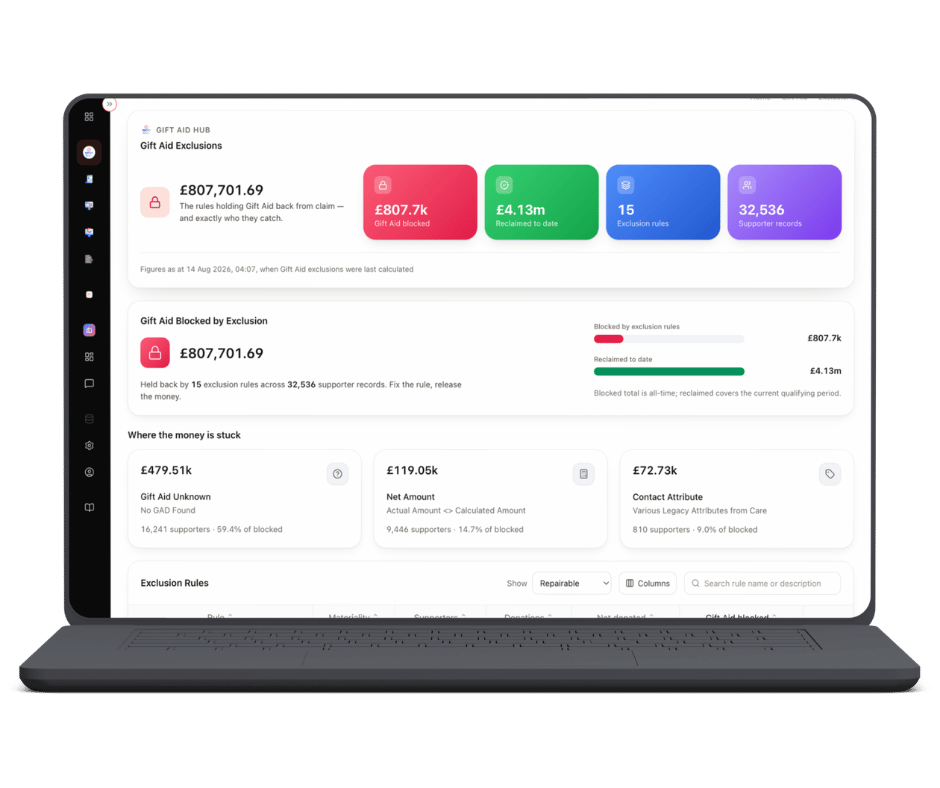
The Gift Aid Hub screen in Cascade 2.0, showing donations sorted into claimed, ready to claim and repairable

Gift Aid Hub

Every donation, in a band you can act on

Open the hub and your income is already sorted: claimed, to claim, repairable, liable, and can’t be claimed. Each band is measured over a qualifying period you can see, with the tax period you are currently in counting down on screen — so nothing quietly ages out while a spreadsheet is being reconciled.

Repairable is the band worth staring at. These are donations that cannot be claimed as they stand, but could be if the data behind them were fixed — a declaration that lapsed before the gift arrived, an address that no longer matches, a supporter record missing a field HMRC needs. The hub tells you which ones and why. Actions is where somebody fixes them.

This is the Gift Aid system HMRC-registered charities have been waiting seven years for: one place where the declaration, the rule that judged the donation, the claim it went out on and HMRC’s answer all sit on the same record.

Want to know what you are leaving on the floor?

Talk to us

How it works

Four steps, start to receipt

1

Draft

Pick a date range and the hub assembles the claim for you: every donation that qualifies under your rules, grouped by tax year, in seconds. Draft as many as you like — nothing is committed until you send it, so you can fix data, rerun, and compare the two.

2

Check

Before anything leaves, you see what was left out and why, down to the individual donation line. Open a line to reach the supporter, the declaration behind them and the rule that made the call. This is the pre-submission audit that used to mean a week of sampling and a lot of trust.

3

Submit

The claim is validated locally against the current HMRC schema, then filed over HMRC’s own interface. A receipt ID comes back on the screen you filed from, and the claim stays in your history where it can be reopened, inspected line by line, or exported.

4

Reconcile

Rejects and queries return line by line, with the reason code written in English and a fix suggested — bad NI number, missing address, declaration expired at the time of the gift. One click sends the line to Actions with the fix scaffolded and an owner against it.

Works with the CRM you already run

Learn more

What it does

Where your Gift Aid actually is

Five bands, no ambiguity

Claimed, to claim, repairable, liable, can’t be claimed. Every donation you hold sits in exactly one of them, against a qualifying period, with the current tax period counting down. You can see what each band is worth before you commit to anything, and open a claim to read the donation lines inside it.

Repairable income is still income

Some donations fail on the data, not on the giving. Sweep back across the years you can still claim and the hub returns every donation that was claimable and never claimed, with the reason it was missed. Push the list into Actions and it becomes work with an owner and a closure reason, rather than a report nobody opens.

Declarations and rules in one place

Every supporter’s declaration state on one screen — active, lapsed, never declared, revoked, superseded — each with its full timeline: the channel it arrived on, the wording used, who keyed it, when HMRC first saw it. The rules that judge them ship with the HMRC defaults and take your own overrides as toggles, so “this product is never claimable” is a setting, not a release.

Deadlines

The claim window closes quietly

Gift Aid rarely expires with a warning. It expires because a period ended while the data behind a few hundred donations was still being tidied.

  • Every band is measured over a qualifying period you can see, not one you have to remember
  • The tax period you are in counts down on screen, next to what is still unclaimed
  • Repairable donations carry the reason they cannot be claimed yet, so the fix is known before the deadline rather than after it
  • Anything still outstanding goes into Actions with an owner, a state and a reason recorded when it is closed

Find out what you could still claim

Point Gift Aid Hub at the donations you already hold and it will tell you what is claimed, what is ready to claim, and what is repairable — with the reason each one was missed. Bring your own data to a demo and we will run the sweep against it.

Book a demo

Part of the Cascade 2.0 core

See pricing

The rest of Cascade 2.0

What Gift Aid Hub hands off to

Actions

Every flag the hub raises becomes a named piece of work with an owner, a state and a reason it was closed. This is where repairable income turns into claimed income.

Learn more

Smart View

The supporter behind every declaration — giving history, declaration state, household links and compliance in one glance, on the same record the claim was built from.

Learn more
Analytics Icon

Media Hub

Declaration images, letters, emails and receipts filed against the supporter they belong to, so the evidence for a claim is one click from the claim line.

Learn more

Harmony

Ask in plain English what your Gift Aid did last year and get the answer with the working behind it — from the same governed model the hub claims on, so it cannot disagree with your dashboard.

Learn more
Search
Menu